
Store Media Studio
A downloadable tool
Store Media Studio
Capture once and export organized promotional media for stores and social platforms directly inside Godot.
Store Media Studio is a Godot 4.7 editor plugin designed to simplify the complete workflow of creating screenshots, store images, social-media exports, image sequences and short animated previews.
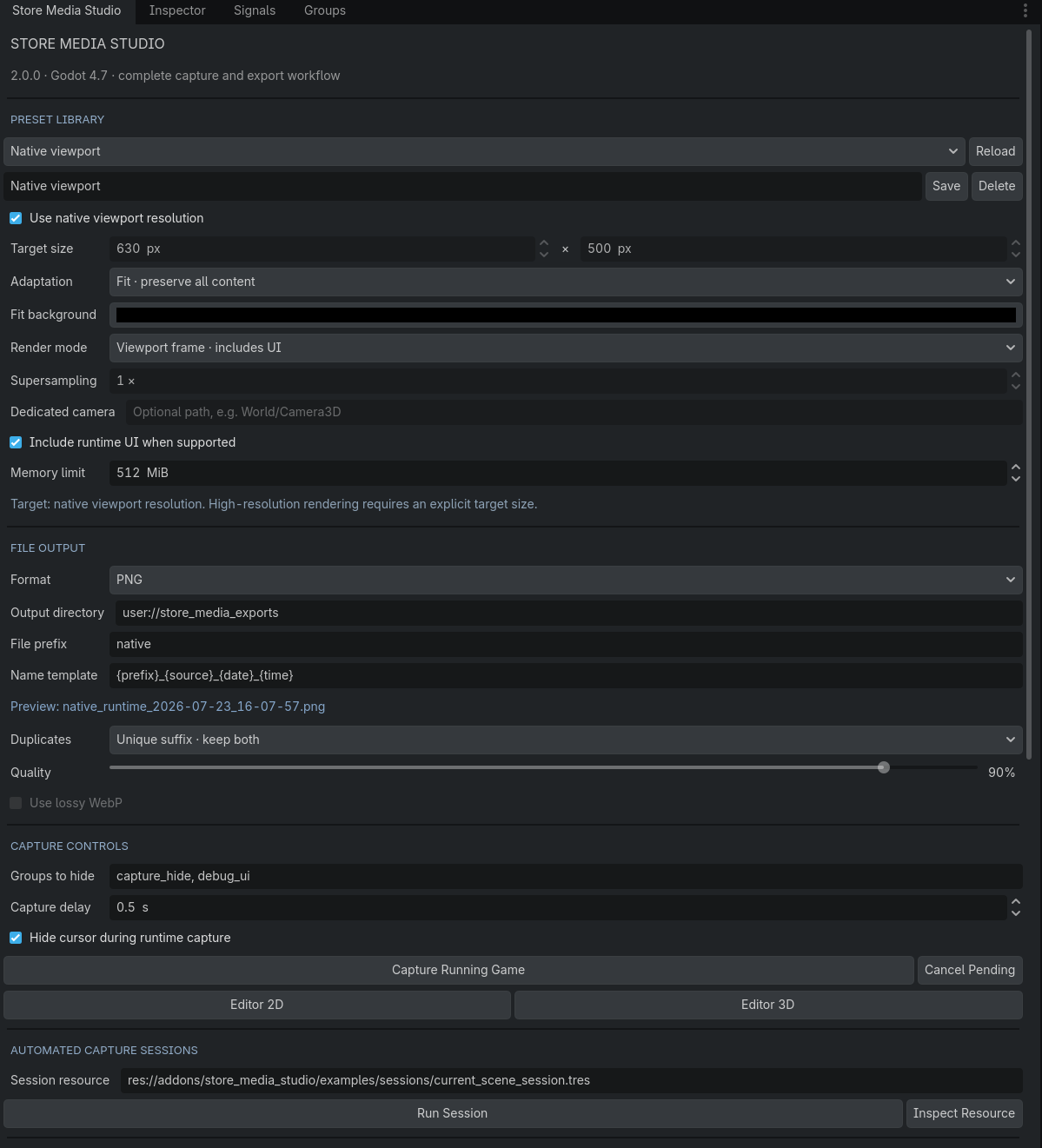
Capture your running project or an editor viewport, apply a reusable resolution preset, hide unwanted interface elements and export correctly named media without repeatedly resizing and reorganizing every file by hand.
Capture Once. Export Organized Media.
Preparing promotional media often requires repeating the same tasks: capturing the game, hiding debug elements, resizing the result, adapting it to several aspect ratios, renaming every file and sorting everything into folders.
Store Media Studio brings these steps together inside one Godot editor dock.
Stop Repeating the Same Export Work
A single game scene may need to be presented as a landscape screenshot, an itch.io cover, a Steam capsule, a square post, a vertical social-media image and a short animated preview.
Store Media Studio lets you reuse presets and capture sessions so these exports remain consistent between store pages, updates, devlogs and promotional campaigns.
How It Works
- Enable Store Media Studio in your Godot project.
- Open the Store Media Studio editor dock.
- Select a built-in preset or configure a custom resolution.
- Choose a capture method and optional visibility settings.
- Configure the output folder, file name and duplicate policy.
- Capture the current viewport, the running game or a complete reusable session.
- Review the generated media and metadata in the integrated gallery.
Press F9 while the project is running to create a quick native PNG capture.
Core Features
- Capture screenshots from Godot editor 2D and 3D viewports.
- Capture the currently running project through the included runtime agent.
- Export images as PNG, JPG or WebP.
- Adapt captures using Fit, Fill and Stretch modes.
- Use native, custom and high-resolution output sizes.
- Render with 1x to 4x supersampling.
- Use an optional dedicated Camera2D or Camera3D.
- Automatically hide and restore selected UI or debug groups.
- Hide and restore the mouse cursor during capture.
- Create reusable presets as editable .tres resources.
- Run reusable multi-scene capture sessions.
- Configure delays, repeated tasks and failure behavior.
- Generate detailed JSON metadata and session reports.
- Use naming templates and organized output folders.
- Handle duplicate files through unique suffix, overwrite or skip policies.
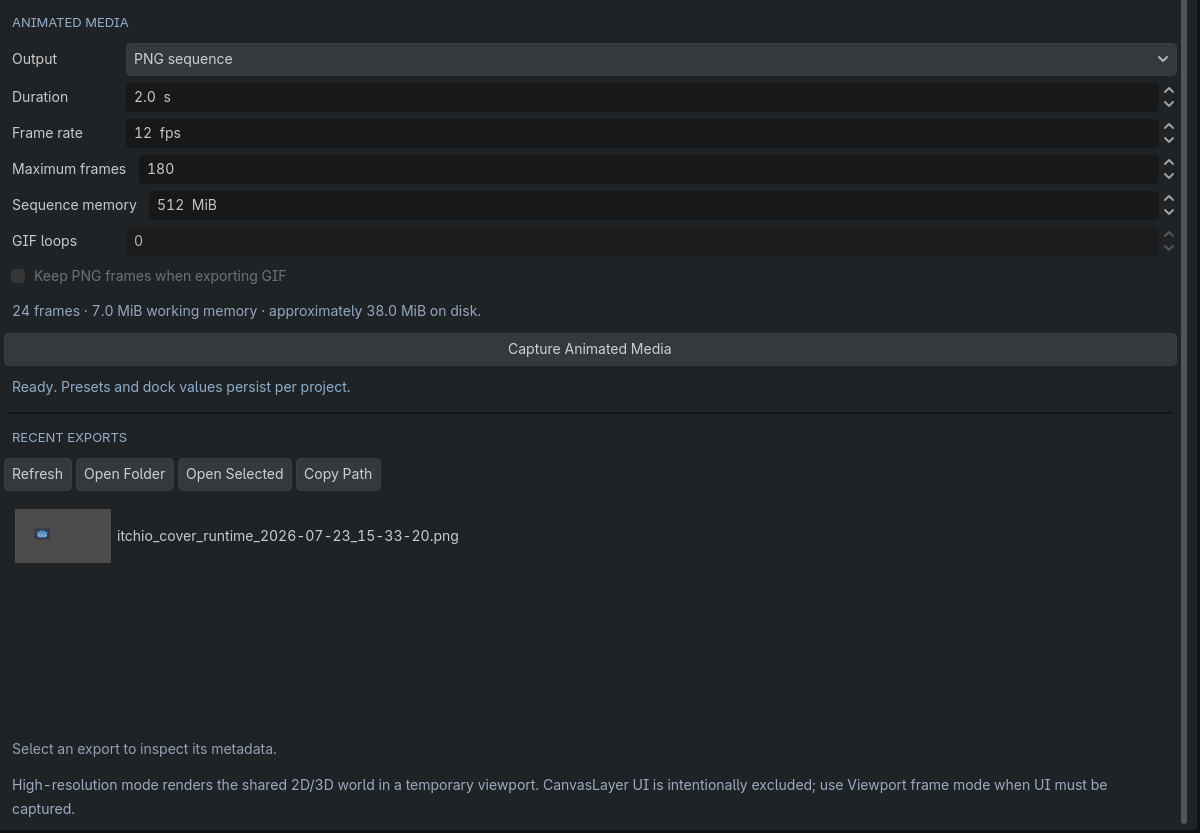
- Capture frame-by-frame PNG sequences.
- Export short GIF89a animated previews without an external encoder.
- Estimate resolution and memory usage before large captures.
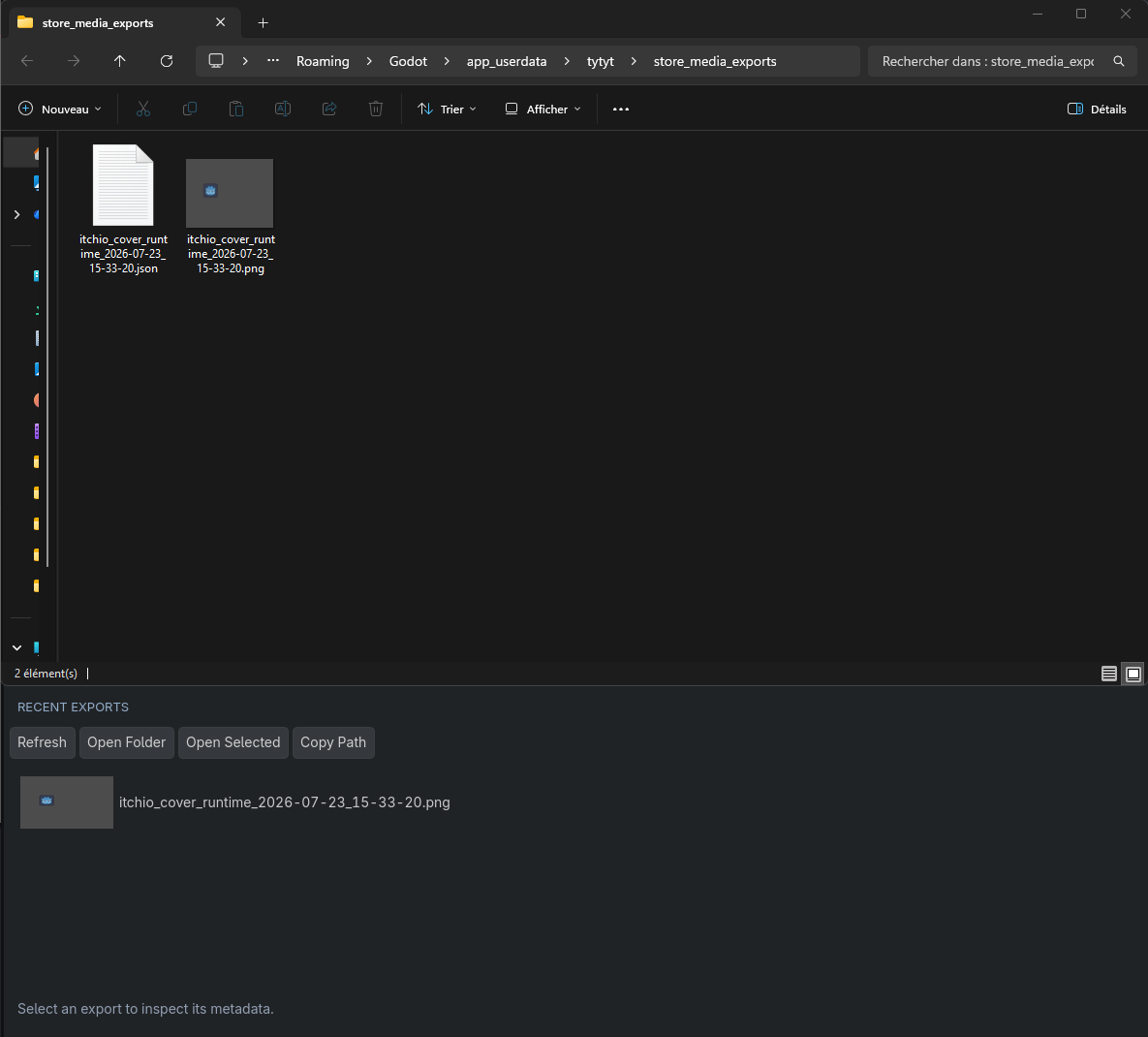
- Browse recent exports through an integrated media gallery.
- Inspect thumbnails and JSON metadata directly from the editor.
Four Capture Workflows
Viewport Frame
Capture the visible running-game viewport, including ordinary runtime interface elements when required.
This mode is useful for complete gameplay screenshots, menus, HUD demonstrations and documentation images.
High-Resolution Re-render
Create a temporary SubViewport and render the active gameplay world at a custom resolution.
Optional supersampling renders the scene at a higher internal resolution before reducing it with high-quality filtering.
This mode is intended for cleaner gameplay-world images and automatically applies configured resolution and memory safeguards.
Automated Capture Sessions
Create reusable capture sessions containing several scenes and capture tasks.
Each task can use its own preset, delay, repetition count, camera path and output configuration.
Sessions can stop or continue after a failure, restore the initial scene and generate a detailed execution report.
Animated Media
Capture a bounded PNG sequence or create a short GIF preview directly from the running project.
Configure the duration, frame rate, maximum frame count, memory limit and GIF loop count.
Animated export is designed for short demonstrations, store previews and social-media posts rather than long-form video.
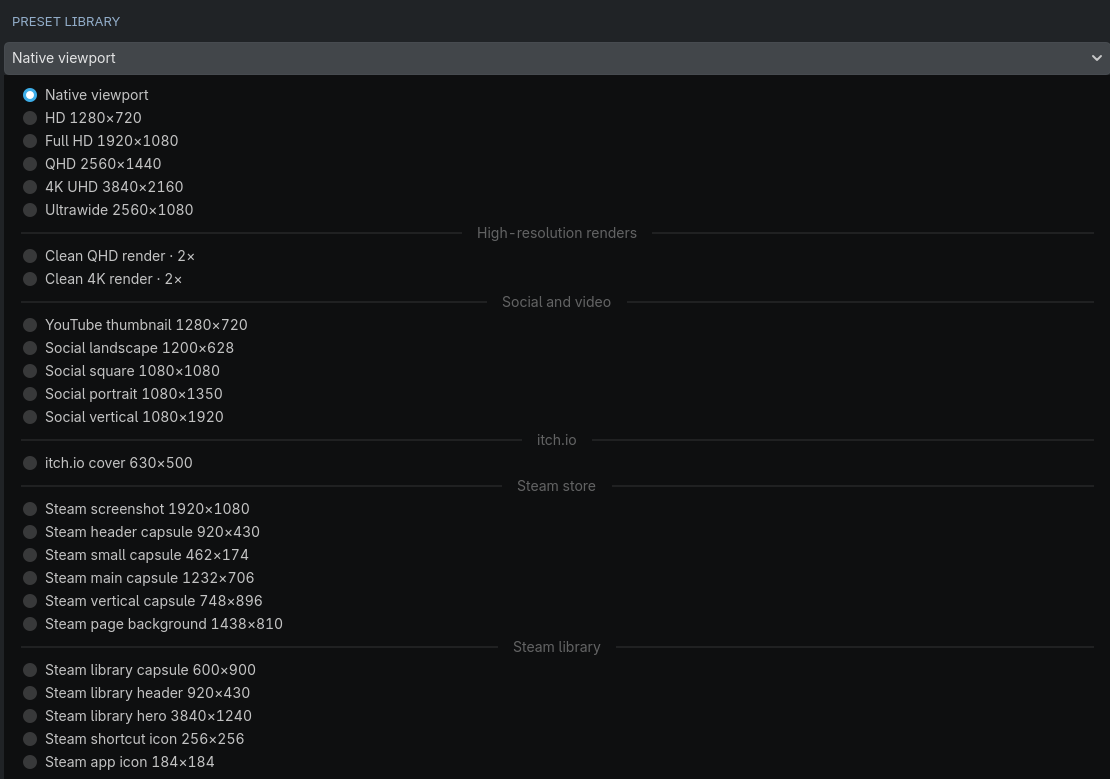
25 Built-In Presets
Store Media Studio includes 25 curated presets covering common capture, store and social-media workflows.
General Capture
- Native viewport
- HD 1280x720
- Full HD 1920x1080
- QHD 2560x1440
- 4K UHD 3840x2160
- Ultrawide 2560x1080
High-Resolution Rendering
- Clean QHD render with 2x supersampling
- Clean 4K render with 2x supersampling
Social and Video
- YouTube thumbnail
- Landscape social post
- Square social post
- Portrait social post
- Vertical social post
Store Media
- itch.io cover
- Steam screenshots
- Steam store capsules
- Steam page background
- Steam library assets
- Steam shortcut and application icons
Every preset can be adjusted and saved as a project-specific editable .tres resource.
Platform requirements can change. Always verify the current platform documentation before uploading final media.
Image Adaptation Modes
Fit
Preserve the complete source image inside the target canvas. Empty areas are filled with the selected background color.
Fill
Fill the complete target canvas while preserving the source aspect ratio. Parts extending outside the canvas are cropped from the center.
Stretch
Resize the source image directly to the target dimensions without preserving its original aspect ratio.
Naming and File Organization
Create reusable file-name templates using the following tokens:
{prefix}
{source}
{project}
{date}
{time}
{width}
{height}
{task}
{index}
Invalid file-name characters are replaced automatically.
When a file already exists, choose between:
- Unique Suffix — create a new numbered file.
- Overwrite — replace the existing file.
- Skip — preserve the existing file and cancel that export.
Supported Export Formats
- PNG
- JPG and JPEG
- WebP
- Frame-by-frame PNG sequences
- Short GIF89a animations
No external encoder is required for PNG sequences or short GIF exports.
Designed For
- itch.io and Steam product pages.
- Game-jam submissions.
- Asset-store screenshots.
- YouTube thumbnails.
- TikTok, Shorts and Reels promotional content.
- Game development devlogs and update posts.
- Documentation and tutorial screenshots.
- Developers maintaining several store and social-media formats.
- Teams that need consistent naming and export organization.
Installation
- Download and extract Store_Media_Studio_1.0.0.zip.
- Copy the following folder into your Godot project:
addons/store_media_studio/
- Open Project > Project Settings > Plugins.
- Enable Store Media Studio.
- Open the Store Media Studio dock.
- Select a preset and configure your first capture.
Back up your project before installing or updating any editor plugin.
Package Contents
- Complete Store Media Studio editor plugin.
- Native and runtime screenshot capture tools.
- High-resolution rendering tools.
- 25 built-in presets.
- Editable preset resources.
- Reusable capture-session resources.
- PNG sequence and short GIF tools.
- Media gallery and metadata tools.
- Example capture session.
- Quick-start and detailed usage documentation.
- Known-limitations documentation.
- Changelog.
- Commercial-use license.
Showcase scenes, raw marketing files and internal development tools are not included in the customer plugin archive.
Requirements
- Godot Engine 4.7.x or a specifically documented compatible maintenance release.
- Enough RAM and VRAM for the selected output resolution.
- A running Godot scene for runtime captures and animated exports.
- A Camera2D or Camera3D when using a dedicated camera path.
Store Media Studio is written entirely in GDScript.
Important Limitations
- High-resolution re-rendering shares the gameplay world but does not clone arbitrary runtime UI trees.
- Use Viewport Frame mode when ordinary CanvasLayer interface elements must appear in the final image.
- Some screen-space effects may look different inside a temporary high-resolution viewport.
- A dedicated camera path must resolve inside the currently loaded scene.
- Very large captures can exceed available RAM or VRAM despite the memory estimate.
- Editor viewport screenshots may contain editor-only overlays.
- GIF export uses a fixed 256-color palette.
- GIF export does not include audio or transparency optimization.
- Animated export is intended for short previews rather than long videos.
- Exact output file size depends on the captured image content.
- If Godot or the running game closes during a capture, normal visibility restoration callbacks cannot complete.
- Store Media Studio does not compose logos, titles, safe-zone overlays or store-specific graphic layouts automatically.
License Summary
You may use Store Media Studio in personal and commercial Godot projects.
You may modify the plugin for use inside projects owned or controlled by you or your licensed team.
You may publish and sell games, applications, screenshots, promotional images and other end products created with the plugin.
Attribution to Asago is not required.
You may not resell, redistribute, share, sublicense or publicly publish the plugin source files, modified source files, documentation or example resources.
You may not include the plugin in a public template, downloadable repository or competing capture and editor product.
See LICENSE.txt inside the package for the complete terms.
Current Version
Store Media Studio 1.0.0
- Godot 4.7 compatibility.
- Editor and running-project screenshot capture.
- PNG, JPG and WebP export.
- Fit, Fill and Stretch adaptation.
- 25 built-in presets.
- Custom resolutions and 1x to 4x supersampling.
- Reusable multi-scene capture sessions.
- Visibility and cursor restoration.
- File-name templates and duplicate policies.
- PNG sequences and short GIF export.
- Integrated media gallery.
- JSON metadata and execution reports.
Support and Feedback
When reporting an issue, please include:
- Your exact Godot version.
- Your operating system and renderer.
- The complete error message and stack trace.
- The selected capture preset or session resource.
- The requested resolution and supersampling value.
- The selected capture method.
- The relevant JSON sidecar or session report when available.
- A screenshot of the Store Media Studio dock when relevant.
Feedback and feature suggestions are welcome in the comments.
Store Media Studio is developed by Asago.
Thank you for supporting independent Godot tools.
Purchase
In order to download this tool you must purchase it at or above the minimum price of $4.49 USD. You will get access to the following files:
Development log
Leave a comment
Log in with itch.io to leave a comment.